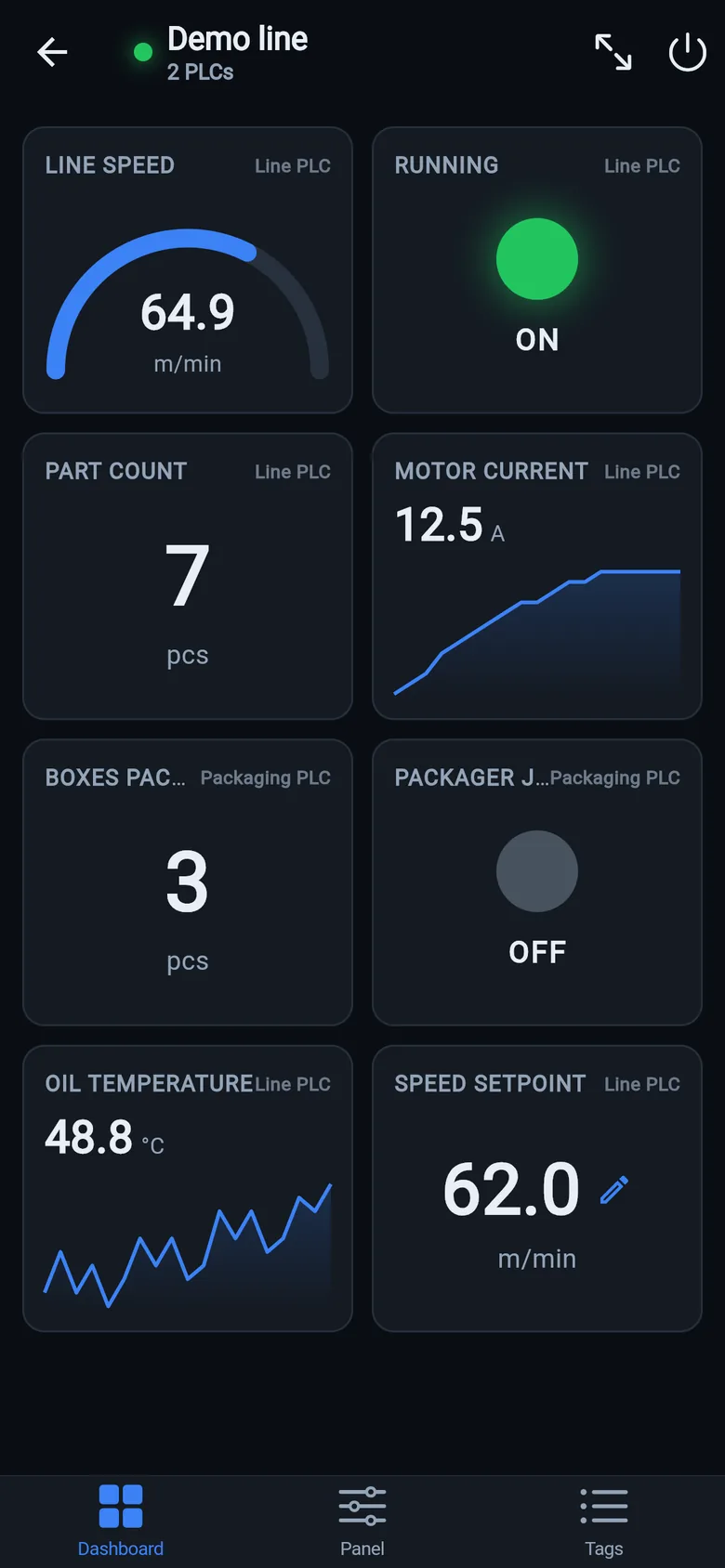
Multi-page dashboards
Number, gauge, LED and trend tiles from every PLC of the machine — mixed brands included. Every tile is labeled with the PLC it reads, so a two-controller line still feels like one machine.

LK Go copies the operator screen while the panel still works and runs the machine from your phone the day it doesn't: minutes with a copy saved in advance, about an hour of work without one. Allen-Bradley, Siemens S7, Modbus TCP. No cloud, no gateway, no PLC logic changes.
The copy you make with LK Go today is the screen that runs the machine the day the panel dies, and the screen LK On stands on the machine with afterwards.
Install LK Go, scan the network, and rebuild the screen the operator actually uses: buttons, lamps, setpoints. Find by action names the tags for you: press the real Start button, the app shows which tag moved. The copy lives on your phone, ready for the day the panel isn't.
Get LK Go free →Open the saved copy, unlock Pro, and the buttons work for real: start, stop, reset, setpoints, through the PLC, exactly like the panel did. The line is producing again while you decide what to do about the panel.
What Pro unlocks →Send the panel and dashboards from LK Go to an LK On touchscreen in two taps, mount it on the machine, hand it to the operators. It stays there for as long as the replacement takes, then returns to maintenance for the next machine.
See LK On →LK Go is a temporary bridge, not a certified HMI and not a safety device: exactly enough for the operator to see the key values and press the right buttons while the proper repair is on its way. Panel dead right now? Start with the 10-minute triage guide.
Allen-Bradley, Siemens S7 or Modbus: type an IP, or let one network scan find every controller. On Logix the app reads the whole tag list by itself; on S7 and Modbus you name points once. Build a dashboard and an operator panel with start/stop buttons for the whole machine, even when it mixes PLC brands.
On Allen-Bradley Logix the app asks the controller for its tag list — including program-scoped tags — and shows live values with types. Search by name, no export files, no mapping.
One sweep fingerprints EtherNet/IP, Modbus and S7 devices on the subnet. Every find becomes a card with the recommended protocol — tap it and the add form is prefilled. A port that answers but refuses data says so, with the fix.
Patent-pending: press the machine's real pushbutton in the rhythm the app dictates, and it returns the tag that followed — on a running machine, down to one bit in an I/O word. Details below.
A parameter snapshot from the first connection, and a timestamped change log of every dashboard tag. The History tab answers the oldest question on the floor — what changed? Details below.
Number, gauge, LED and trend tiles from every PLC of the machine — mixed brands included — organized into pages. Each tile is labeled with the PLC it reads.
Large start/stop pulse buttons, hold-to-run jog, latching switches, setpoints and status lamps. Full-screen panel mode keeps the screen awake — the phone becomes a temporary operator station.
No tag names in the protocol? Add a register or absolute address — DB1.DBD4, M0.0, 40001 — with type and scaling, name it once, and watch the live preview as you type. The map saves into the machine profile.
Alarm words and status codes map to operator texts — every bit one message. A red banner over every tab, an alarm list tile, and a journal of appeared and cleared. Unnamed bits get named the moment they first fire.
Values are validated against the point's type and limits, switches confirm, and a hold-to-run button releases the moment the app loses focus. Writes are part of Pro — a one-time $59.99 purchase, no subscription.
PLCs, named points, dashboard and panel layouts saved as one profile. Export it as a file and share with a colleague — they get your exact screens on their phone.
The Devices screen finds LK On devices on the local network. Sign in and copy dashboards and panels both ways — build a layout on the couch, send it to the panel on the machine.
Tag lists are cached per PLC, so a machine opens at once with everything named where you left it — the live connection catches up in the background.
A copy made in advance restores in minutes. Without one, recovery is about an hour of work. Here is how it goes.
Connect LK Go (or LK On) to the PLC. On Allen-Bradley Logix the controller hands over its whole tag list, no export, no software. Get the person who knows the machine on the phone; together you pick the start, stop and reset tags, the feedback lamps and the setpoints, and drop them on a panel. Know the machine yourself? Then it's just you and the tag list.
| Line3_Start_PB | BOOL | 0 |
| Conv_Run | BOOL | 1 |
| Line_Speed_SP | REAL | 128.5 |
| Filler.State | DINT | 3 |
| Fault_Code | DINT | 0 |
The dead panel's export (FactoryTalk View, View Designer, TIA Portal, Weintek) goes into the free converter and comes out as an LK Go screen with its buttons, indicators and values. You get the controls back with their real tags; layout graphics and alarm logic are not carried over, and a compiled .mer alone is not enough: the converter needs the XML your HMI software exports. The PLC's L5X export opens as live ladder on LK On, so you can see why the line won't start.
FactoryTalk View ME/SE View Designer TIA Portal / WinCC Weintek L5X Tag CSV
Allen-Bradley plus Siemens plus Modbus covers most of a plant floor — and one machine can mix them behind a single dashboard and panel.
CompactLogix and ControlLogix — the Logix 5000 family. The app reads the controller's own tag list, controller- and program-scoped, with types. Zero configuration, nothing to export.
S7-300 and S7-400, plus S7-1200/1500 with PUT/GET enabled and non-optimized DBs. Absolute addressing — DB1.DBD4, M0.0, IW2. When a CPU refuses, the app shows the exact TIA Portal fix instead of timing out.
Schneider, AutomationDirect and Click PLCs, VFDs, energy meters, gateways — anything speaking Modbus TCP. Enter the register map once — address, type, scaling, name — and it lives in the machine profile.
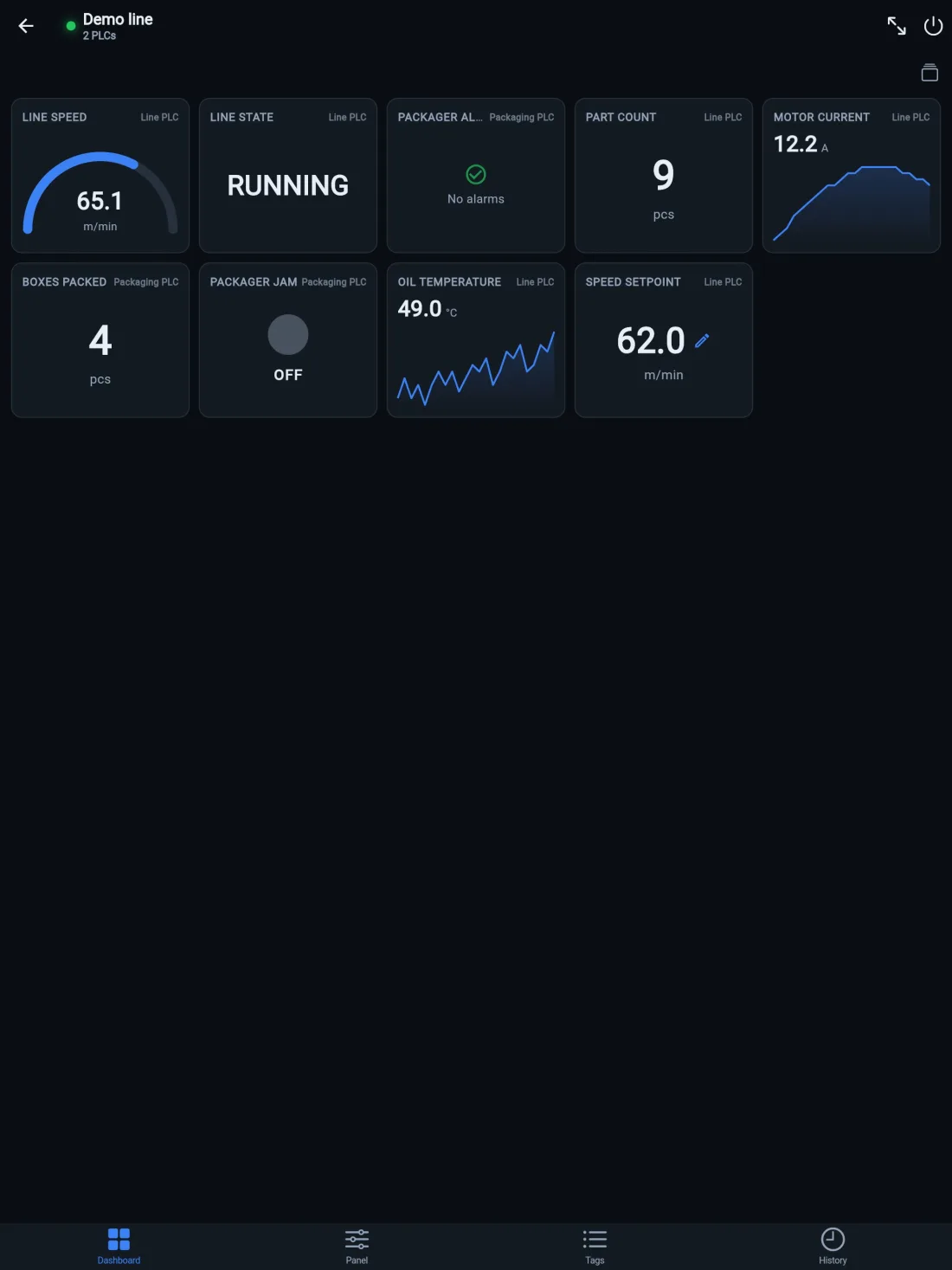
Number, gauge, LED and trend tiles from every PLC of the machine — mixed brands included. Every tile is labeled with the PLC it reads, so a two-controller line still feels like one machine.
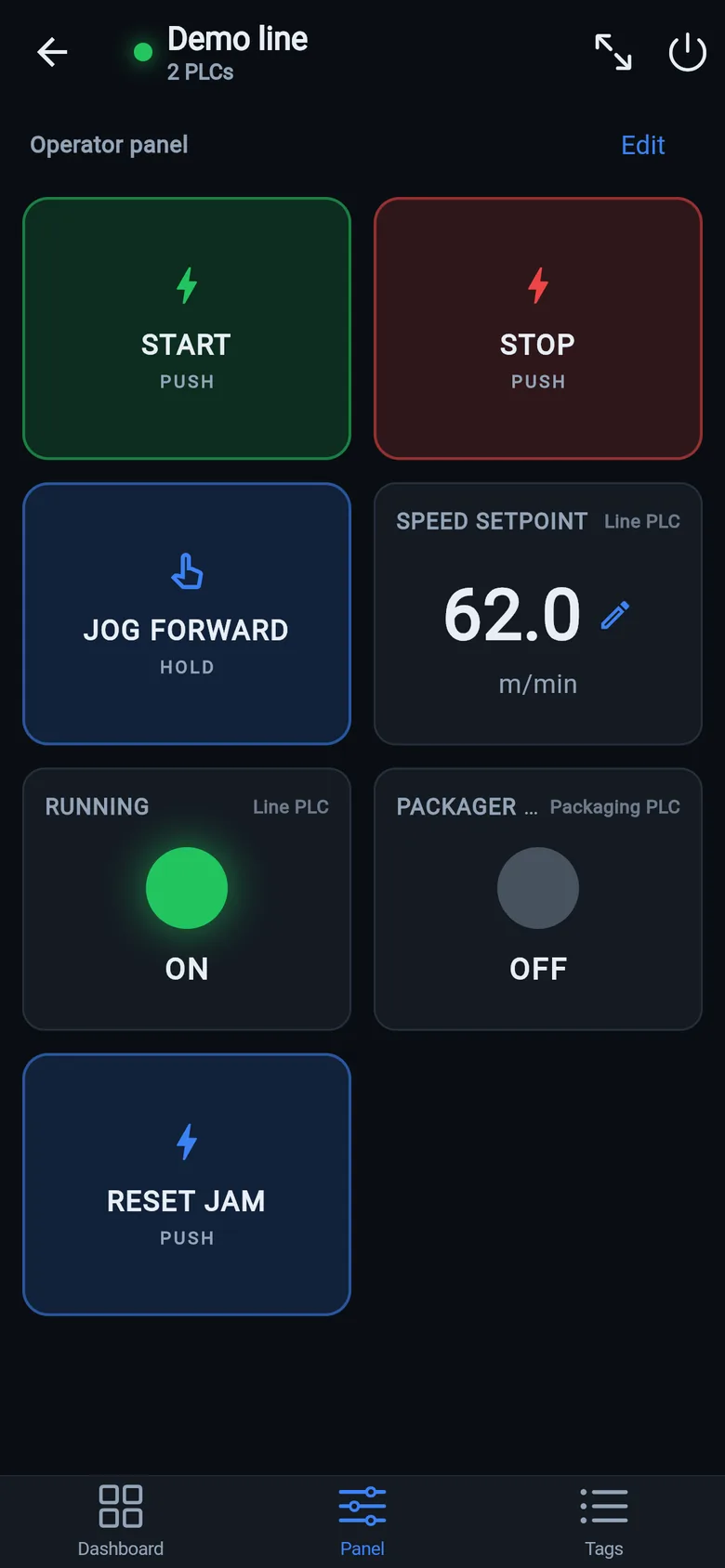
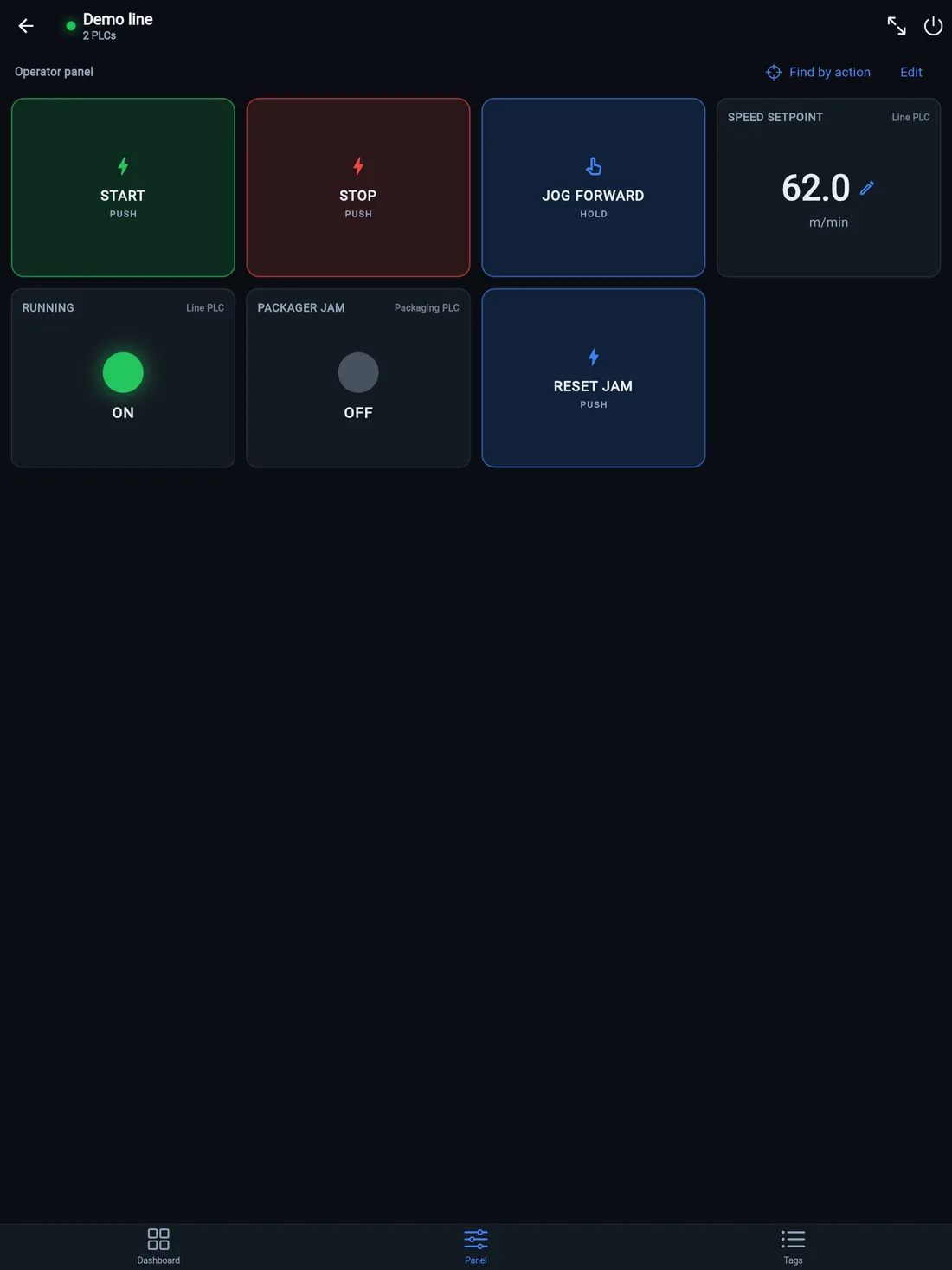
Large start/stop pulse buttons, hold-to-run jog, latching switches, setpoints and status lamps — with panel pages per part of the machine. Full-screen mode keeps the screen awake: the phone becomes a temporary operator station.
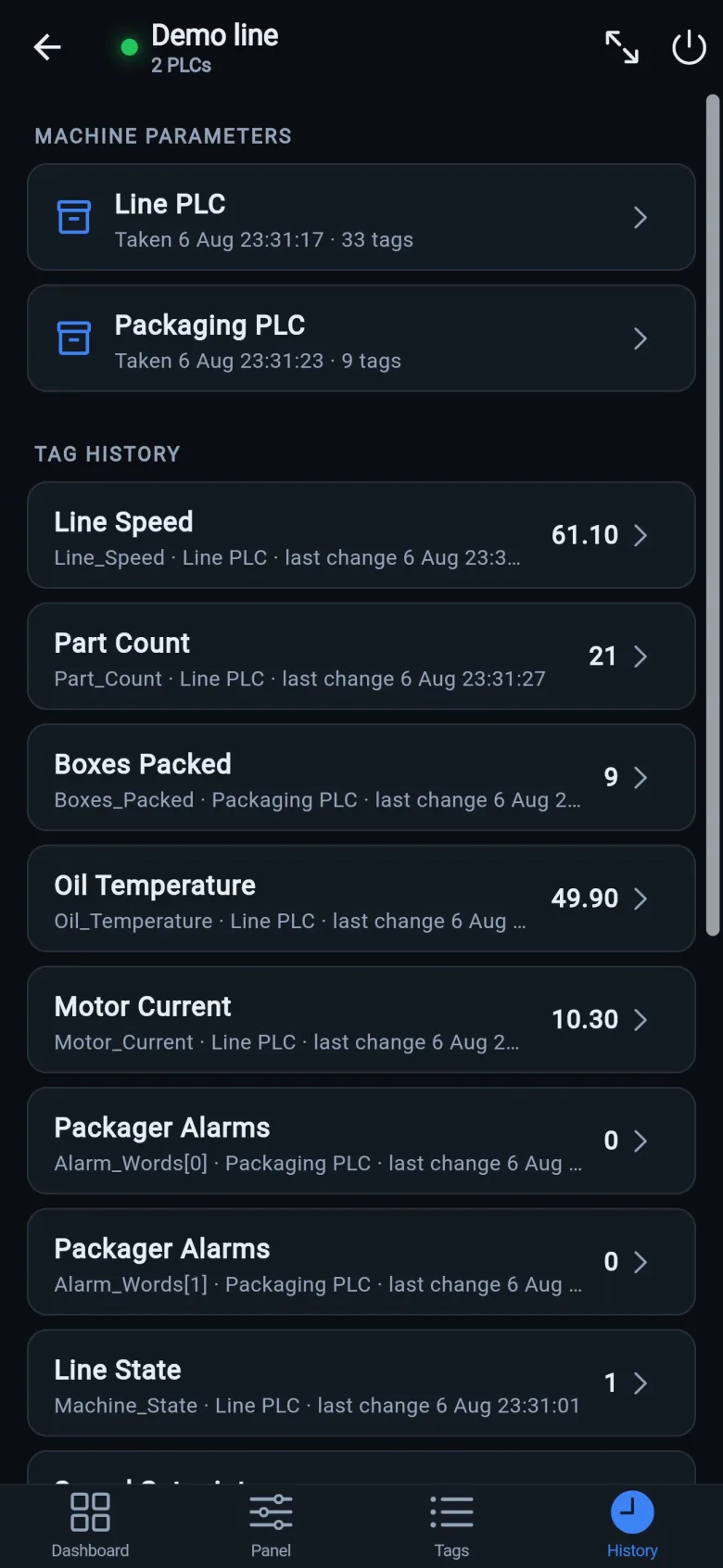
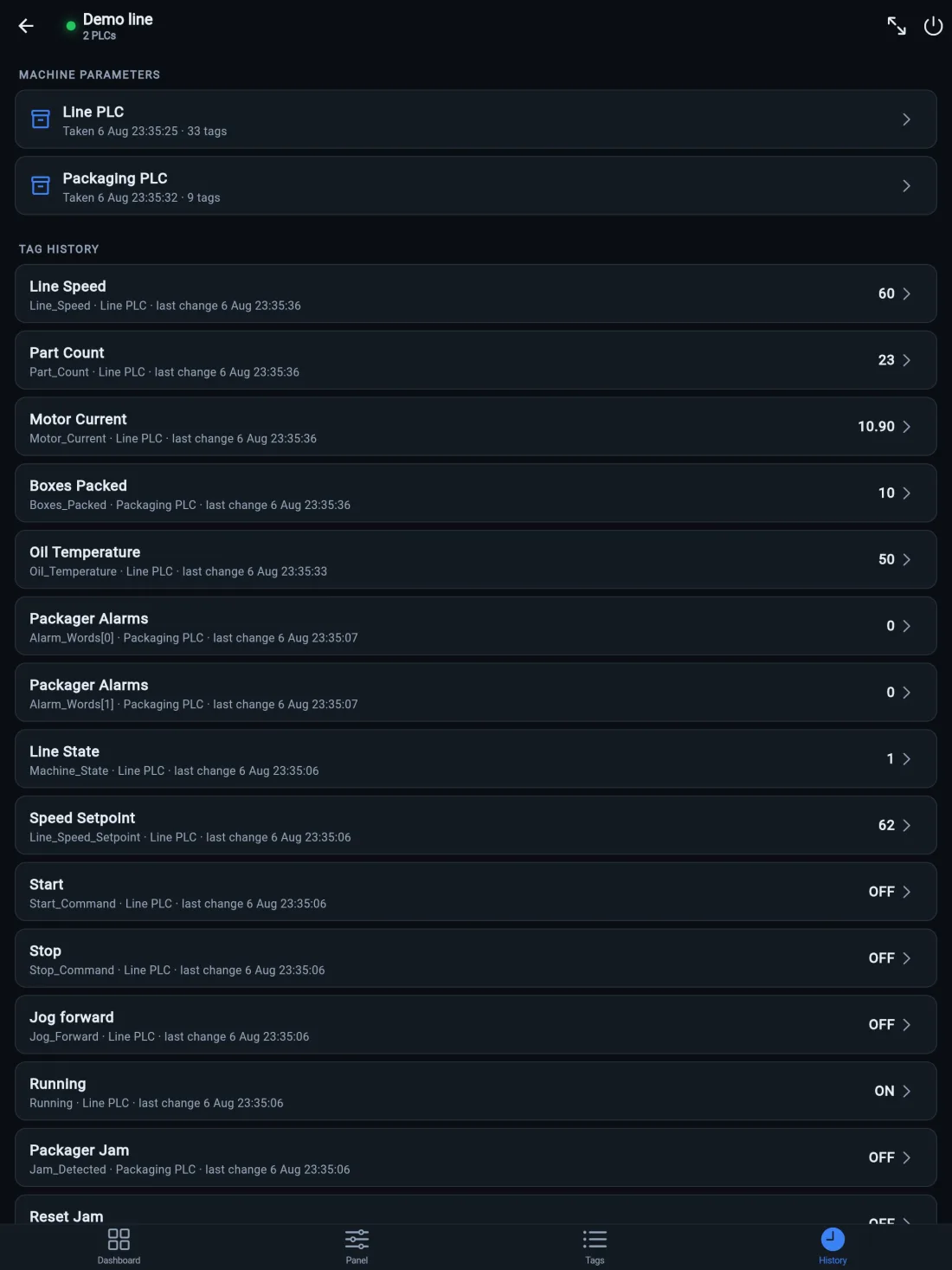
A snapshot card per PLC, then every dashboard tag's changes with timestamps — the History tab answers the oldest question on the floor: what changed?
Part of Pro · how it works
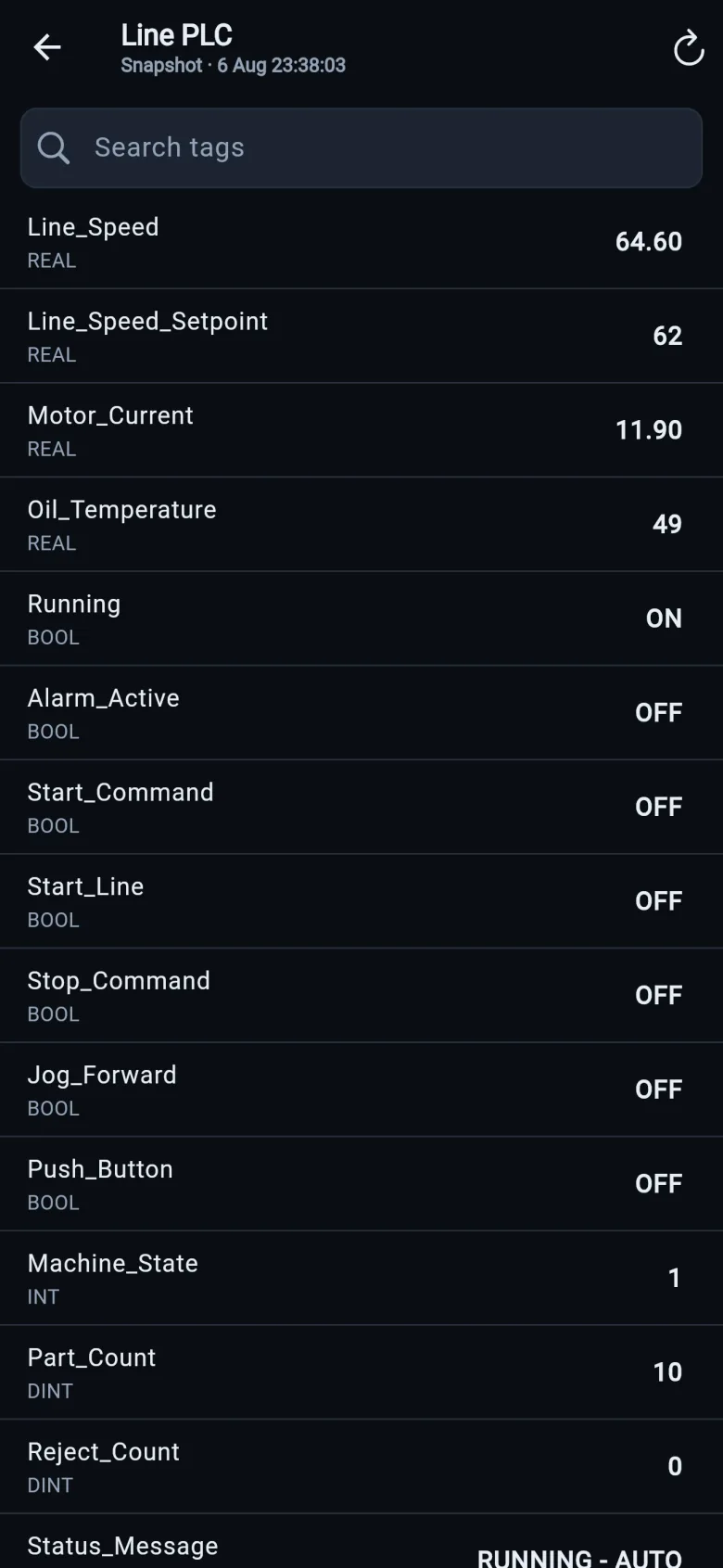
Taken automatically the first time the app connects — how the machine was set up on its good day, searchable. Take a fresh one by hand right after a good changeover, and you'll always have numbers to compare against.
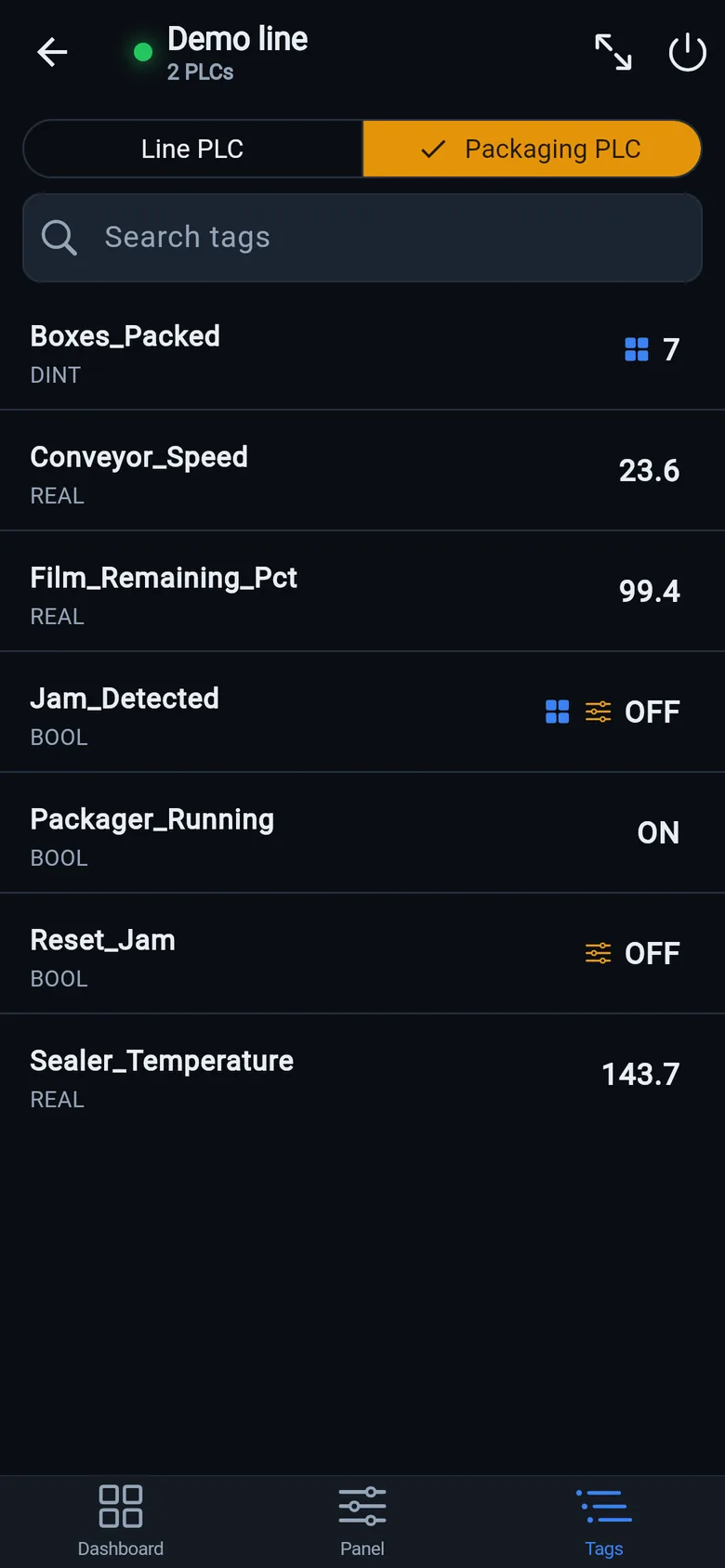
On Allen-Bradley Logix the controller hands over its own tag list — controller- and program-scoped, I/O modules included — live, with search. On S7 and Modbus your named points show up here the same way.
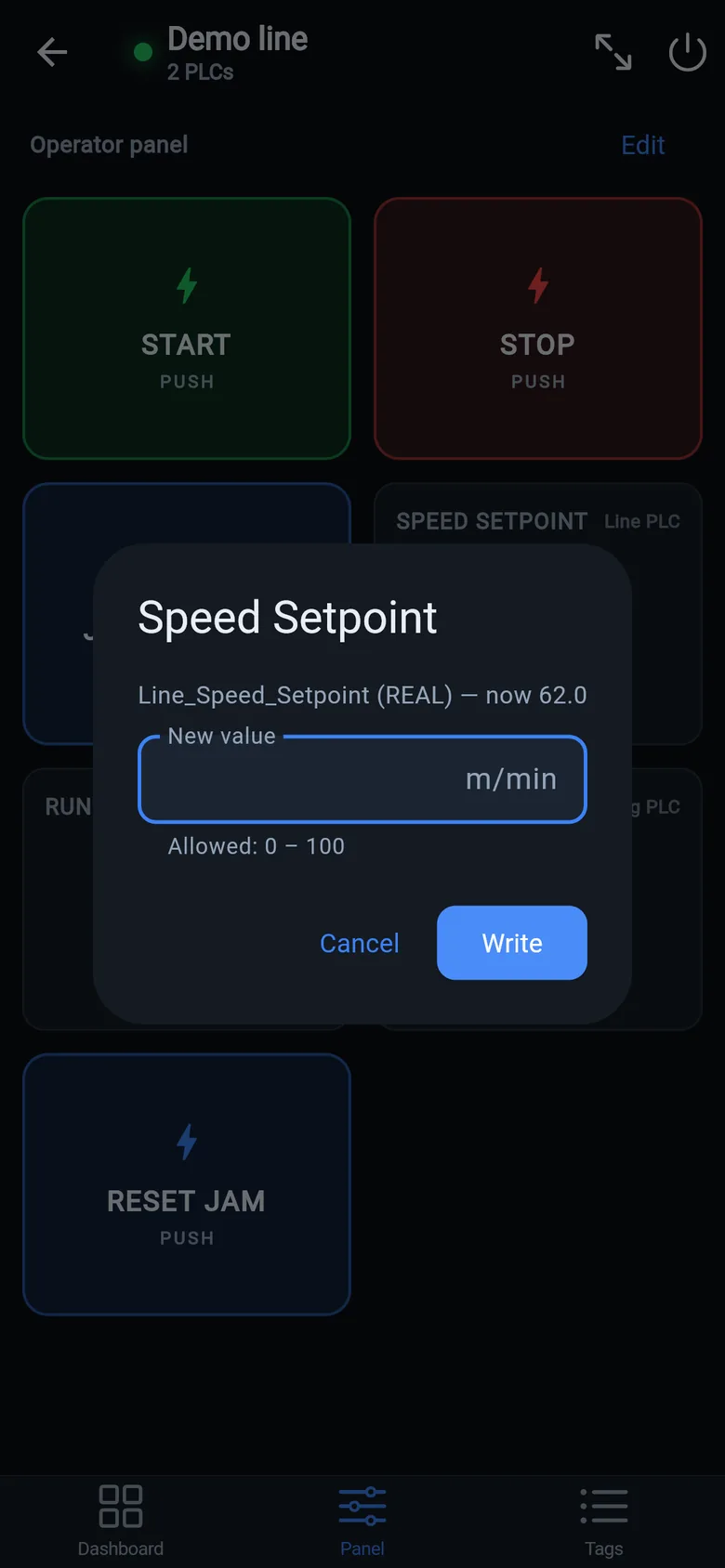
Setpoints are checked against the point's type and allowed range, with a confirm before anything reaches the controller. Writes are part of Pro — a one-time $59.99 purchase, no subscription.
LK Go is one universal app. On an iPad the dashboard fits more tiles and the operator panel gets bigger buttons — a portable operator station you can prop on the machine.
Everything you need to prepare is free. The only paid thing is control of a real machine: a one-time purchase, never a subscription.
Everything for the copy you make while the panel still works, and for looking at a machine.
Unlocks control of a real machine. Buy it in the app the moment you need it: no account, no waiting.
 On a desktop? Scan with your iPhone or iPad to get the free app.
Free download — browsing, dashboards and alarms included.
Leave an email and we'll send the invite with the install steps:
Prefer self-serve? Join the testers group (the page asks you to sign in to a Google account first — that's expected, not an error), then become a tester and install from the Play Store.
No PLC around? The built-in demo line works five minutes after install.

LK On is the same idea as a dedicated touchscreen: 7″ $800 or 10″ $900, one-time, on preorder (ships within 8 weeks of order, full refund before shipping, 30-day money-back after delivery). It stands on the machine while the replacement panel is repaired or shipped, logs tag history around the clock and runs daily health reports. A temporary bridge and a diagnostics tool, not a certified HMI and not a permanent replacement for the panel. LK Go finds it on the network and copies your dashboards and panels both ways.
Patent pending. On Modbus and S7 the protocol has no tag names, and even on Logix the program is often someone else's. Find by action skips the program entirely — the machine itself shows you the tag.
Looking for a setpoint, not a button? Parameter mode starts from the machine's own display: type the value it shows now — a speed, a temperature — nudge it one small step with the machine's own controls, and the app narrows every point down to the register that holds it. Works on all three protocols.
Machines rarely break on their own. A setpoint gets nudged, a night shift "improves" a speed, and three weeks later nobody remembers what the good numbers were. The app keeps the machine's memory.
Honest limits: history lives on the phone and records while the app is connected — it's a technician's notebook, not a plant historian. For 24/7 logging that never sleeps, that's the LK On's job. On real controllers machine history is part of Pro; on the built-in demo line it's free.
No hardware yet? Open the built-in demo line first — two virtual PLCs with moving values, a packager that jams and wants its reset, and start/stop/jog that actually work. Every Pro feature is free there — writes, the History tab, snapshots — so it's the fastest way to learn the whole app from the couch before you're on the plant floor.
The models we point people to, and when you don't need one, are on the gear list →
No. A copy made in advance restores in minutes; without one, recovery is about an hour of work. Connect LK Go to the PLC, get your programmer on the phone, and pick the tags that matter together: on Allen-Bradley Logix the controller hands over its whole tag list, so you search by names and addresses. Have the panel's project export? Drop it into the free converter and the controls come back with their tags. Find by action needs the panel alive, so it's the tool for the copy you make today, not for tomorrow's rescue.
Two things, both free: install LK Go (it puts live values on a phone in about 15 minutes, and start/stop buttons once the right tags are identified) and tell us the line is down. The remote triage call is free, and often the panel failure has a workaround (or a repairable cause) that gets you producing before any hardware arrives. Start with the 10-minute triage guide.
Three protocols. Allen-Bradley CompactLogix and ControlLogix — the tag-based Logix 5000 family — over EtherNet/IP, with the tag list read straight from the controller. Siemens S7-300/400 and S7-1200/1500 (with PUT/GET enabled and non-optimized DBs) over S7comm. And anything speaking Modbus TCP — Schneider, AutomationDirect and Click PLCs, VFDs, energy meters, gateways. Micro800, SLC-500 and PLC-5 are not supported.
Almost always one of Siemens' two factory defaults: PUT/GET communication is disabled, or the data blocks are "optimized" and have no absolute addresses. The app detects the refusal and shows the exact TIA Portal steps for each case — enable PUT/GET in the CPU's Protection settings and untick optimized block access on the DBs you want to read — instead of a silent timeout.
A Modbus point is a register address plus a data type and scaling. Enter it once, give it a name, and watch the live value preview as you type. The named register map is saved in the machine profile — share the profile as a file and a colleague gets the whole map on their phone.
A patent-pending way to find a tag without knowing the PLC program. Press the machine's real pushbutton in the rhythm the app dictates: a baseline pass on the running machine first sets aside counters, timers and drifting analogs, then lock-in windows eliminate out-of-rhythm coincidences, and the app returns the tag that followed your presses — down to a single bit inside an I/O word. A parameter mode does the same for setpoints: nudge it one step on the machine's own controls, and the app finds the register that changed — scale factors included.
It works on all three protocols, not just Allen-Bradley. On Logix the app sweeps the controller's whole tag list and hands back the real tag name. On Modbus it sweeps the coil and holding-register ranges; on Siemens, the flag area plus one data block whose number you enter — S7comm can't enumerate DBs. There the answer is an address (MB4.3, co34), and you give it a name once.
No. The app speaks the same protocols an HMI uses — EtherNet/IP, S7comm, Modbus TCP — directly to the controller. Nothing is installed on the PLC, no program changes, no OPC server, no cloud account. Values go from the controller straight to your phone. On Siemens S7-1200/1500 classic S7 communication needs PUT/GET enabled and non-optimized DBs: a CPU access setting your Siemens person changes in TIA Portal, not a change to the program.
Browsing and dashboards only read values — the same polling load as one extra HMI screen. Writing a value is always deliberate: every write asks for confirmation, values are validated against the point's type and limits, and the first write shows a one-time responsibility notice.
That's genuinely IT's decision, so here is what they will want to know. There is no cloud at all: traffic goes phone-to-controller on the local segment and stops there — no account, no server, nothing leaves the plant. Reads are the same standard requests any HMI already makes, on the same ports — EtherNet/IP TCP 44818, S7comm TCP 102, Modbus TCP 502 — with no PLC program change and no inbound ports opened on the phone. And the free version is read-only by design, so IT can allow it as a view-only tool and treat writing as a separate decision.
The phone doesn't have to join OT Wi-Fi either: a USB-C Ethernet adapter into a spare machine-switch port puts it on the wire with the network config untouched. Where personal devices are banned outright, the standard practice is a company tablet under MDM, mounted as a panel. If IT still says no, that's their call to make — but let them make it on facts: send them the one-page summary below.
No. A piece of equipment in the app can hold several PLCs — even a mix of brands, an Allen-Bradley line PLC next to a Siemens packager. They share one dashboard and one operator panel; every tile shows which PLC it reads, and each PLC reconnects independently if it drops.
The phone must be on the same network as the controller — plant Wi-Fi that routes to the PLC VLAN, or a wired connection through a USB-C Ethernet adapter. There is no cloud relay: if you can ping the PLC, the app can connect to it.
Yes. Alarm words and status values map to operator texts — every bit of an INT or DINT can be one alarm message. Active alarms show in a red banner over every tab, in an alarm list tile on the dashboard, and on an Alarms screen with a session journal of appeared and cleared events. When an unnamed bit fires, you can name it on the spot.
The first time the app connects to a PLC it records a parameter snapshot — a searchable list of the values as they were that day — and from then on keeps a timestamped change log of every dashboard tag while the app is connected, with a marker whenever the link dropped. Take a fresh snapshot manually any time, for example right after a good changeover. Everything stays on the phone; nothing goes to a cloud.
Honest limit: it records only while the app is connected — a technician's notebook, not a 24/7 plant historian. On real controllers machine history is part of Pro; on the built-in demo line it's free.
Yes. The Devices screen finds LK On devices on the local network — or add one by IP — and after signing in with the device's own role and password, dashboards and operator panels copy both ways: pull the device's screens onto your phone, or build a layout in the app and send it to the device as a new named dashboard. Existing dashboards on the device are never wiped, and widgets with no web equivalent are skipped and listed — never dropped silently.
Yes — LK Go is a universal app, so the same tag browser, dashboard and operator panel run on both iPhone and iPad from one free download. The larger iPad screen just fits more dashboard tiles and bigger panel buttons, which makes it a handy portable operator station on the machine.
LK Go is a free download. Browsing, dashboards, alarms, the network scan and Find by action are free. Pro — a one-time $59.99 in-app purchase, no subscription — unlocks writing values and machine history on real controllers. In the App Store the purchase is listed as “Write Unlock”: that is Pro.
Yes — LK Go is live on the App Store, listed there under the company name “LineKeeper”: a free install for iPhone and iPad. Browsing, dashboards and alarms are free; Pro is a one-time $59.99 in-app purchase, listed there as “Write Unlock”.
Direct link to this list: linekeeper.net/app#it-brief